.png)
There was a lot more new stuff than expected.
Cherlynn Low for Engadget
I wasn't expecting Apple to have a ton of interesting updates to the Apple Watch this year, but somehow it managed to surprise me. Some of the new features coming to the Apple Watch Series 12 are things the competition has already offered, like Readiness scores and increased sampling rates. But others, like the Audio Intelligence suite of tools and even the new finishes and materials, are novel. I'm also not against AI wearables that listen to your surroundings and conversations, as long as done responsibly and with accountability, so I'm intrigued by things like Siri Recap and Live Rewind.
Unfortunately, I wasn't really able to test out most of these features at the demo area right after today's "Surprise and shine" keynote ended. But I did get to spend a bit more time with some Apple Watch demos, and carefully scrutinize what exactly is different on the Series 12. I also got a bit more detail on how the new Audio Intelligence features work and whether Apple is listening to your conversations. (Short answer: No.)
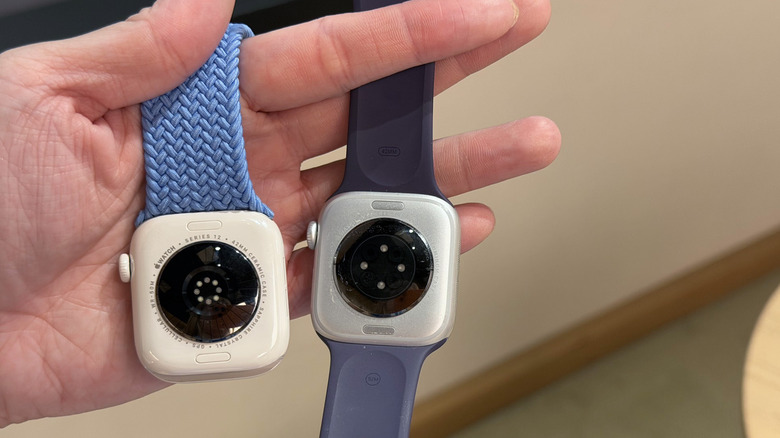
One of the main changes in the Apple Watch Series 12 is in the sensing system, which Apple says it has re-architected. I actually got to compare my Series 11 to the new smartwatch, and their undersides certainly look quite different. I could go into greater detail on how the photodiodes and the LEDs have been upgraded and rearranged, but suffice to say that on the newer model, you'll notice a ring of 12 lights compared to the four LEDs laid out in a diamond shape on last year's device.
New health sensing system on the Apple Watch Series 12
Cherlynn Low for Engadget
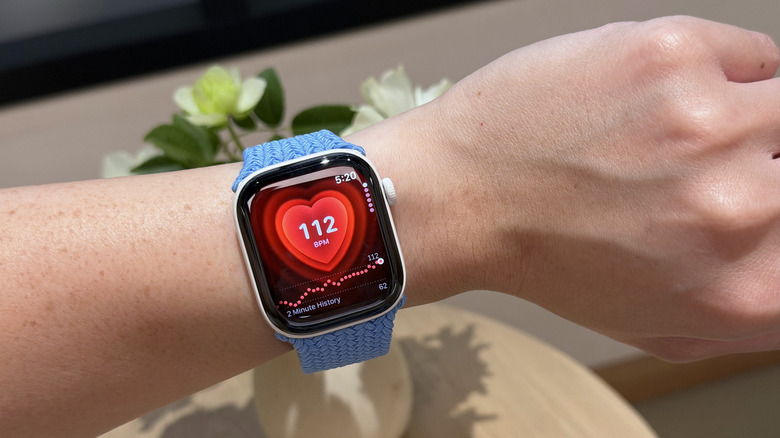
If you look really close, you'll notice differences in other components as well, like the number and layout of the diodes and electrodes around the LEDs. What all this leads to is an increased surface area that's in contact with your skin, which together with the updated hardware should lead to more accurate and consistent readings. Apple is also increasing its sampling rates so it's getting measurements of your heart rate (and therefore related data like your VO2Max and heart rate variability) much more frequently. Apple goes as far as to say that it conducted its own study of wearables and found the Series 12 to be the most accurate in heart rate sensing.
That data feeds into a few health-related features on the Apple Watch Series 12, including the updated heart rate app, which has a new HRV metric. That's now measured at up to every five minutes, compared to every two to four hours or so on older watches.
The HRV information is a key part of the new Readiness app on the watch, and factors into your readiness score each day. This is delivered daily on a scale of 0 to 10, and takes into account your activity, sleep and vitals. Of course, I wasn't able to test this myself as I'd have to wear an Apple Watch for at least seven days for it to work. But the number I did see on a company rep's watch was a concerning "3," and upon closer investigation the Health app said that poor sleep and HRV performance brought the score down.
Apple also made some tweaks to the Vitals app, changing up some of the language it uses around performance. But the biggest update to the Apple Watch experience might be outside of the watch itself. The Health app is getting quite a significant makeover, which might sound like welcome news to longtime users who never quite enjoyed how to make sense of their data in that app.
Since Apple Intelligence summaries are part of the redesigned Health app, you'll have to have a compatible iPhone to use it. (If not, you'll see the current version.) This updated version is coming later this year, with the first thing you see being a summary generated by Apple Intelligence at the top. This considers the time of day to deliver your most relevant information at the time. Then come tiles that show your metrics like activity, heart and sleep, and these will also change order throughout the day.
Swiping sideways on the home screen will take you through sleep, fitness and heart pages, while the bottom navigation bar shows you options to go into the Longevity and data tabs. The Longevity tab is a new interface that not only measures your wellbeing across seven different areas including the ones I already mentioned, but also shows your "health age." It's a bit confusing to me all the different names for what I think should be the same thing, but I'm sure after I spend some time with the app later this year I'll understand the distinctions better. I'm also intrigued and keen to try out some of the new assessments in the app, like the one for VO2Max where you'll have to follow along instructions to jog in place, while the Health app studies your heart rate from your Apple Watch or compatible AirPods to evaluate your performance.
While the refreshed Health app isn't going to be available for a while, nor is it exclusive to the Apple Watch Series 12, it certainly impacts a lot of your experience. It is where you'll spend a lot of time looking at your health data, after all. But more features coming to the Series 12 are around AI, performance and "audio intelligence."
Audio Intelligence, AI and privacy concerns on the Apple Watch Series 12
One thing that's important to keep in mind when thinking about the new Apple Watch's sound and listening-related features is the S11 chip. It's designed with what Apple calls the "secure exclave," which is where the raw audio coming in from the watch's microphone is being processed. That's where the sound is transcribed and processed, and only the results of that interpretation leave the exclave. It won't store any of the audio it gets, Apple says.
With this, there are four updates related to sound. First up is the most straightforward: Improvements to Shazam on your watch. Right now, if you want to pull up Shazam to identify a song playing around you, you might scroll through the smart stack on your watch and whizz past or land on the Shazam widget. Then you'd tap it and wait for the system to listen and guess the tune. On the Series 12, because it has a buffer of the previous 15 seconds of audio information to work with, it can already start looking up the song once you scroll past the Shazam widget. This means it can potentially recognize music much more quickly.
Next is the sound recognition tool that has long been an accessibility feature in iPhones. This uses the mics in your iPhone, for instance, to alert people to important sounds like alarms, sirens, babies crying or glass breaking. The Series 12 will be able to deliver alerts about these sounds even if a companion iPhone isn't close by. For people who are deaf or hard of hearing, this could be a handy expansion.
More interesting of the suite of updates here are the Live Rewind and Siri Recap features. Live Rewind can basically deliver a transcript of the last 15 seconds of what someone near you might have said at any given time. You just double click the dial on your Apple Watch Series 12, and a screen pops up, while the microphone indicator appears at the top right corner to show it's pulling audio data. In my demo, I saw all these cues followed by onscreen text that certainly seemed to accurately transcribe what the Apple rep had said just seconds earlier.
I don't really have the time at the moment to break down all my thoughts, concerns and understanding of the way this works just yet. The takeaway is that the Apple Watch is not technically recording audio and is instead producing a rolling buffer of audio that's constantly overwriting itself inside its Secure Exclave. It's then transcribing at the Secure Exclave level, and everything else it produces is based off that transcript, which means the effectiveness of these features has a lot to do with the quality of the models behind that process. Plus, it only starts transcribing when the button is pressed twice, so it's not always transcribing.
Finally, Siri Recap creates "high-level" summaries of events, rather than a full transcript. It's something you'd more actively set up to listen to your surroundings on either a schedule or manually each time you're in a meeting, for instance. I wasn't able to test this, but I saw the Recaps in a companion iPhone's Siri App, under the new Recaps tab. Apple does specifically say that Recap does transfer audio from your Watch's exclave to the iPhone's exclave in its 11-page privacy overview, though it notes that the encrypted file will be "inaccessible to the operating systems, apps, the user or Apple."
The last thing I want to point out for now is that I am enamored with the Ceramic variant of the Series 12. It felt smooth, and unsurprisingly almost like porcelain. I didn't spend enough time with it to know if it will feel sturdy over time, but I definitely liked the way it looks.
I'm sure I'll learn more about the new Apple Watch Series 12 features when I get to test out a review unit, but for now, I'm sure we can agree there were a lot more updates than can be quickly covered in a relatively brief article. I'm intrigued by the audio intelligence features and how they'll perform in the real world, and how they might impact performance and battery life. Stay tuned, as I'll go over that in my full review.





 English (US) ·